Books visits
Checks the service and ZIP code, shows open times from your Clientavo Custom Calendar and confirms only after the visit is saved.
The assistant says: Your appointment is confirmed in the company calendar.
24/7 AI BOOKING AGENT FOR HVAC COMPANIES
Clientavo adds an AI assistant to your website. It answers from the facts you approve, checks your service area and books visits into your calendar, day and night.
Free to build and test on your site, no card. Your 30-day trial starts only when you start it. No charge until day 31.
Card needed at activation · Regularly $199 now $99/month (excl. VAT / taxes) after the trial · Cancel anytime; cancel before the trial ends and pay nothing · No automatic overage charges
Turn late-night chats into booked jobs.
Every qualified lead, callback request and confirmed appointment lands in your workspace with the full conversation.
SEE IT WORK
AFTER YOUR OFFICE CLOSES
Many homeowners look for help in the evening. If nobody answers, the next company on the list often gets the job.
A form only collects a name. Nobody checks the ZIP code, the problem or how urgent it is until the office opens.
Service area, diagnostic fee, financing, warranty. The same few questions take up phone time every week.
Without a record of each conversation, you don’t know which visits started online.
WHAT THE ASSISTANT DOES
Checks the service and ZIP code, shows open times from your Clientavo Custom Calendar and confirms only after the visit is saved.
The assistant says: Your appointment is confirmed in the company calendar.
Uses only the services, prices and policies you approved. When it isn’t sure, it says so and offers a callback.
The assistant says: The diagnostic visit is $89. The team confirms any repair price on site.
With the visitor’s permission, keeps the name, phone number, problem and preferred time in your workspace.
The assistant says: Your callback request is saved.
REAL HVAC CONVERSATIONS
| Situation | The visitor writes | What the assistant does |
|---|---|---|
| No heat at 2 AM | “The heat stopped working and the house is getting cold.” | Offers the next open time or a callback request. Never promises an overnight visit. |
| New system quote | “I’d like a quote for a new heating and cooling system.” | No price is invented. Books an estimate visit or saves a callback. |
| Outside the service area | “Do you service 30310? My AC is leaking water.” | No appointment outside your ZIP codes. |
| Gas smell | “I smell gas near the furnace.” | Tells the visitor to leave and call 911 or the gas utility. Stops offering appointments. |
| Price question | “How much is a service call?” | Answers with your diagnostic fee only if you approved one. |
| Not sure | “Do you service Mitsubishi mini-splits?” | “I don’t have that detail confirmed.” Then offers a callback. |
SAFE BY DESIGN
THE MORNING AFTER
Open your dashboard to the conversations, callback requests and appointments that need your attention.
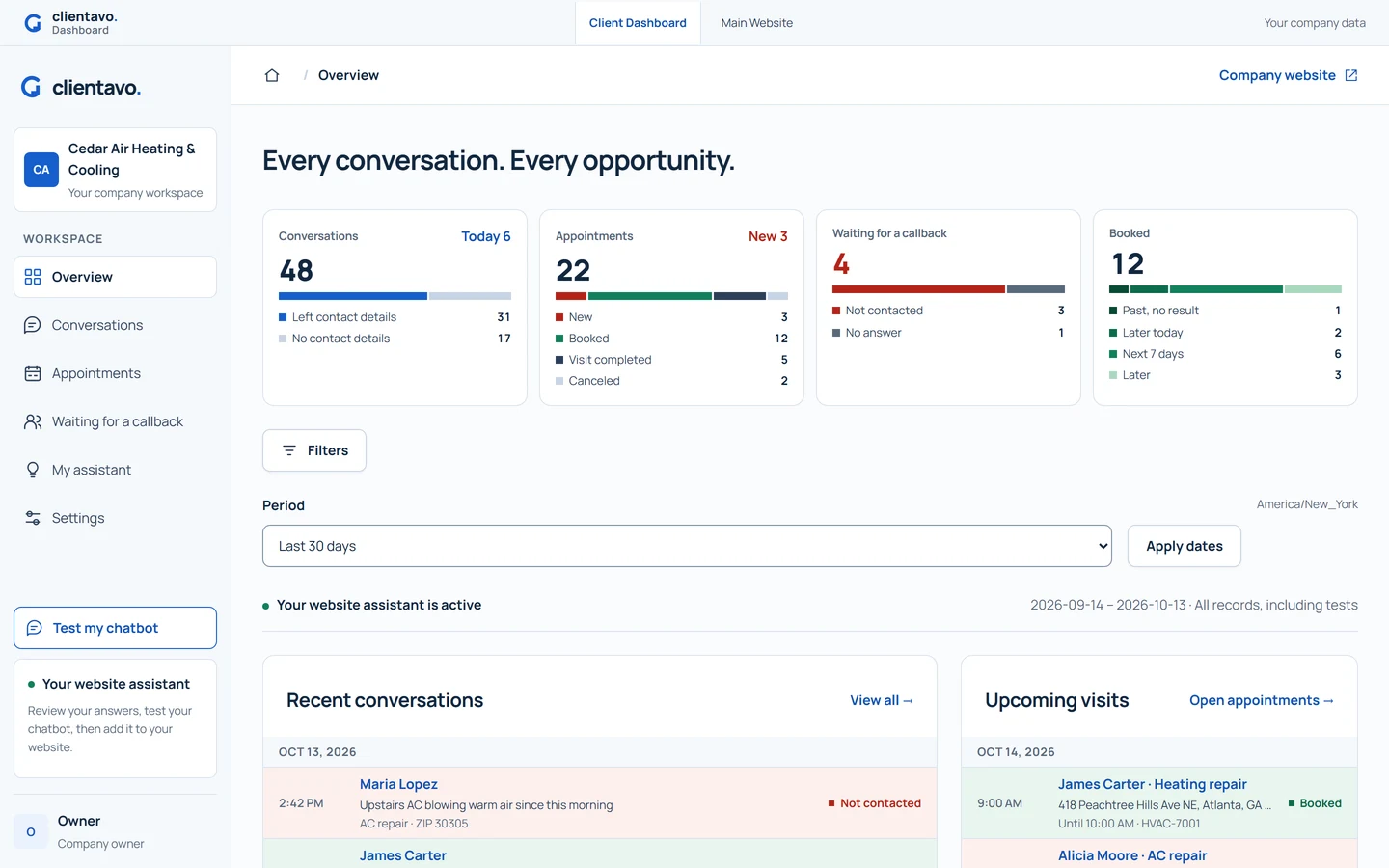
The company workspace with fictional data.
FROM SIGN-UP TO LIVE
Clientavo reads your pages and turns them into drafts for you to review.
Correct or remove anything. Only what you publish goes live.
Talk to your assistant in a private preview before any visitor sees it.
Add the script to WordPress, Wix, Squarespace or any HTML site.
One script tag. It loads asynchronously, so your page does not wait for the chat.
WordPress · Wix · Squarespace · HTML
Your website needs to allow custom code; some website plans do not.
<script async
  src="https://widget.clientavo.com/widget/v1/loader.js"
data-widget="your-widget-id"></script>FROM A WEBSITE VISIT TO A SERVICE REQUEST
Answer the question. Capture the details. Help the customer take the next step — even after closing.
| What your business gets | ClientavoOne connected workflow | Contact form | Booking page | Website onlyNo AI assistant | |||
|---|---|---|---|---|---|---|---|
| Answers visitor questions 24/7 from facts you approveHelp homeowners while the office is closed, without guessing. | YesApproved answers | Not included | Not included | Not included | |||
| Checks the service and ZIP codeQualify requests against your services and coverage. | Yes | Not included | Limited or depends on setupIf configured | Not included | |||
| Takes callback requests without a bookingSave the opportunity when someone is not ready to choose a time. | Yes | YesRequest field | Limited or depends on setupSeparate form | Not included | |||
| Books a visit after the customer confirmsA reviewed service, address and time, checked against your calendar. | YesClientavo Custom Calendar | Not included | Yes | Not included | |||
| Keeps the conversation with the contact and appointmentSee the request without asking the customer to start again. | Yes | Limited or depends on setupSubmitted fields | Limited or depends on setupBooking fields | Not included | |||
| Shows who needs a callback, with notes and call outcomesA follow-up queue with preferred contact times. | Yes | Not included | Not included | Not included | |||
| Books across several staff calendarsEach company has one Clientavo Custom Calendar today. | Not includedOne calendar | Not included | YesTeam plans | Not included | |||
| More details: answers, follow-up, booking rules, reports and installation | More details: answers, follow-up, booking rules, reports and installation | ||||||
| Uses your reviewed services, prices and policiesYou control the company facts the assistant uses. | YesReview & publish | Not included | Limited or depends on setupService listings | Limited or depends on setupStatic content | |||
| Asks follow-up questions about the problemUnderstand the request before your team picks it up. | Yes | Not included | Limited or depends on setupIntake fields | Not included | |||
| Captures names and phone numbers with consentKeep the details you need to follow up. | Yes | YesForm fields | YesBooking fields | Not included | |||
| Follows your hours, visit duration and notice rulesKeep offered appointments within your business rules. | Yes | Not included | YesIf configured | Not included | |||
| Records accepted or declined outcomes after a callAdd an appointment after an agreement, or close the request. | Yes | Not included | Not included | Not included | |||
| Highlights questions that need an approved answerImprove your knowledge using the questions visitors actually ask. | Yes | Not included | Not included | Not included | |||
| Reports conversations, contacts and booking conversionChoose a date range and see how inquiries become appointments. | Yes | Limited or depends on setupSubmissions only | Limited or depends on setupBookings only | Not included | |||
| Offers self-service website installationUse your own snippet on a website that allows custom scripts. | YesJS snippet + guide | YesBuilder or embed | YesLink or embed | Not applicableNothing to install | |||
ONE CLEAR PLAN. ROOM TO PROVE ITS VALUE.
Before you pay: cancel before the trial ends and you pay nothing. After your first payment: request a refund within 7 days through account support (once per business; renewals excluded).
Founding HVAC Partner Rate — lock in $99/mo forever (regularly $199/mo).
Limited to the first 30 HVAC companies. 30 spots remaining.
Can pay for itself with one booked after-hours visit.
One company and one login. An always-on website assistant.
Start free trialFree setup, no card. The trial starts when you activate it. A card is required at activation. No charge until day 31.
Upgrading early needs your confirmation. Final plan terms appear at checkout.
DO YOUR OWN MATH
An everyday repair often leaves around $300 after labor and parts.
$99 ÷ $300, rounded up. An illustration, not guaranteed revenue.
Missed customers a month × profit per job. It assumes those customers book with you; it does not predict how many the assistant will win back.
GOOD QUESTIONS.
No mysteries. Just the details that matter.
The public demo is separate from your account and does not create or bill subscriptions. Registration alone does not start the trial.
Clientavo adds an AI chat assistant to your website. It uses the business details and answers you approve to help visitors, check your service area and save callback requests with permission. Once online booking is on, visitors can choose an available time and confirm a visit, and it goes into your Clientavo Custom Calendar. You manage conversations, contacts and appointments in your dashboard. You stay in control of what goes live.
It says, “I don’t have that detail confirmed.” It can then offer to save the visitor’s name, phone number and question with their permission. It must not guess a price, warranty or service policy. You can see unanswered questions in your workspace and add a reviewed answer for future conversations.
Your services, service ZIP codes, opening hours, appointment duration, booking rules, business phone number, diagnostic fees, warranties, financing information and answers to common questions. Review information imported from your website, correct or remove it, then approve and publish the assistant’s knowledge. Conversations already in progress keep the answers they started with; your current service and booking rules are checked again before any new booking. Customer conversations and private notes do not automatically become answers for other visitors.
The trial includes up to 250 visitor conversations. Each paid month includes up to 1,500 conversations. A conversation counts from the visitor’s first message. At a limit the AI pauses, with no automatic overage charge; while your subscription is active, visitors can still leave their number through the contact form.
Yes. For example: “My AC is not cooling. Please call me this afternoon.” With the visitor’s permission, the assistant saves their name, phone number, problem and preferred callback time in your workspace. Your company follows up. No service appointment is created, and no callback time is guaranteed.
Copy the JavaScript snippet from your Client Dashboard and add it to your website’s custom-code area. Follow the platform-specific instructions, then verify the installation. Some site-builder plans restrict custom code.
No. Once online booking is on, the visitor reviews available times and confirms in the chat. Confirmation is shown only after the visit is saved in your Clientavo Custom Calendar. The customer can then add the visit to their own calendar.
Clientavo works with Clientavo Custom Calendar, which is included in your account. Bookings go straight into it, and no other calendar or account is needed. It shows your visits and blocked time, and you choose how many visits can happen at the same time. To see visits on your phone, add the read-only Clientavo calendar link to your phone’s calendar app. Online booking stays off until your services, ZIP codes and working hours are set. You can also keep it off: the assistant then answers questions and takes callback requests with the visitor’s permission, and your team calls them back.
By email. You choose the address and can turn emails on or off for new contacts and callback requests, confirmed or changed appointments, calendar problems and usage warnings. A new-contact email shows the name, phone number, service and a short summary of the request, with a link to the full details in your dashboard.
The plan costs $99 (regularly $199) per month (excl. VAT / taxes) after a 30-day trial. Setup and the private preview are free and need no card. You add a card when you activate the trial. There is no charge until day 31: cancel before the trial ends and you pay nothing. Checkout shows the trial end, the first charge date and any tax before you subscribe. Paying before the trial ends is a separate step you confirm, and it charges right away. The public demo never asks for a card.
Founding HVAC Partner Rate — lock in $99/mo forever (regularly $199/mo). Limited to the first 30 HVAC companies. 30 spots remaining. A place is taken when a company’s first subscription payment at $99 goes through. A company that activates its trial at the founding rate keeps it after the trial, and the rate stays with the company account, also if it cancels and subscribes again later.
Open Billing in your account and cancel renewal. Your service continues until the end of the current paid period, then the AI assistant, new bookings and workspace access stop. For 2 years your website keeps a simple contact form marked Powered by Clientavo, and we email you each request it receives; then its button shows Chat offline. Cancel before the trial ends to avoid the first subscription charge. The billing page shows your exact end date.
Yes. The cancellation policy keeps your company information and saved customer records so you can return after three months without starting over. After the subscription ends, the workspace stays locked; only account recovery and resubscription remain available. Cancelling a subscription does not request data deletion.
AI assistant · Answers from our product guide.
I’m an AI assistant. I answer only from Clientavo’s product guide and say when I don’t know, the same rule your website assistant follows. Please don’t share personal or customer details.